
🤔 What is Minecraft: Bedrock Edition?
The Hive is a Featured Server on Minecraft: Bedrock Edition.
Minecraft: Bedrock Edition is a version of Minecraft that can be played on any of the following devices:
- Computers running Windows 10/11
- Modern Xbox, PlayStation and Nintendo Switch consoles
- Android phones and tablets (running Android Oreo or later)
- Apple iPhones and iPads (running iOS/iPadOS 13 or later)
- Chromebooks (running ChromeOS 111 or later)
- Amazon Fire Tablets (running Fire OS 7 or later)
The Bedrock edition of Minecraft is cross-platform, meaning you can play with other players on any of the supported devices listed above.
🎮 How do I play The Hive on Minecraft: Bedrock Edition?
The Hive is a Featured Server, meaning you can find it on the servers tab.
Once you have opened Minecraft, simply click play, and then select the servers tab as seen below:
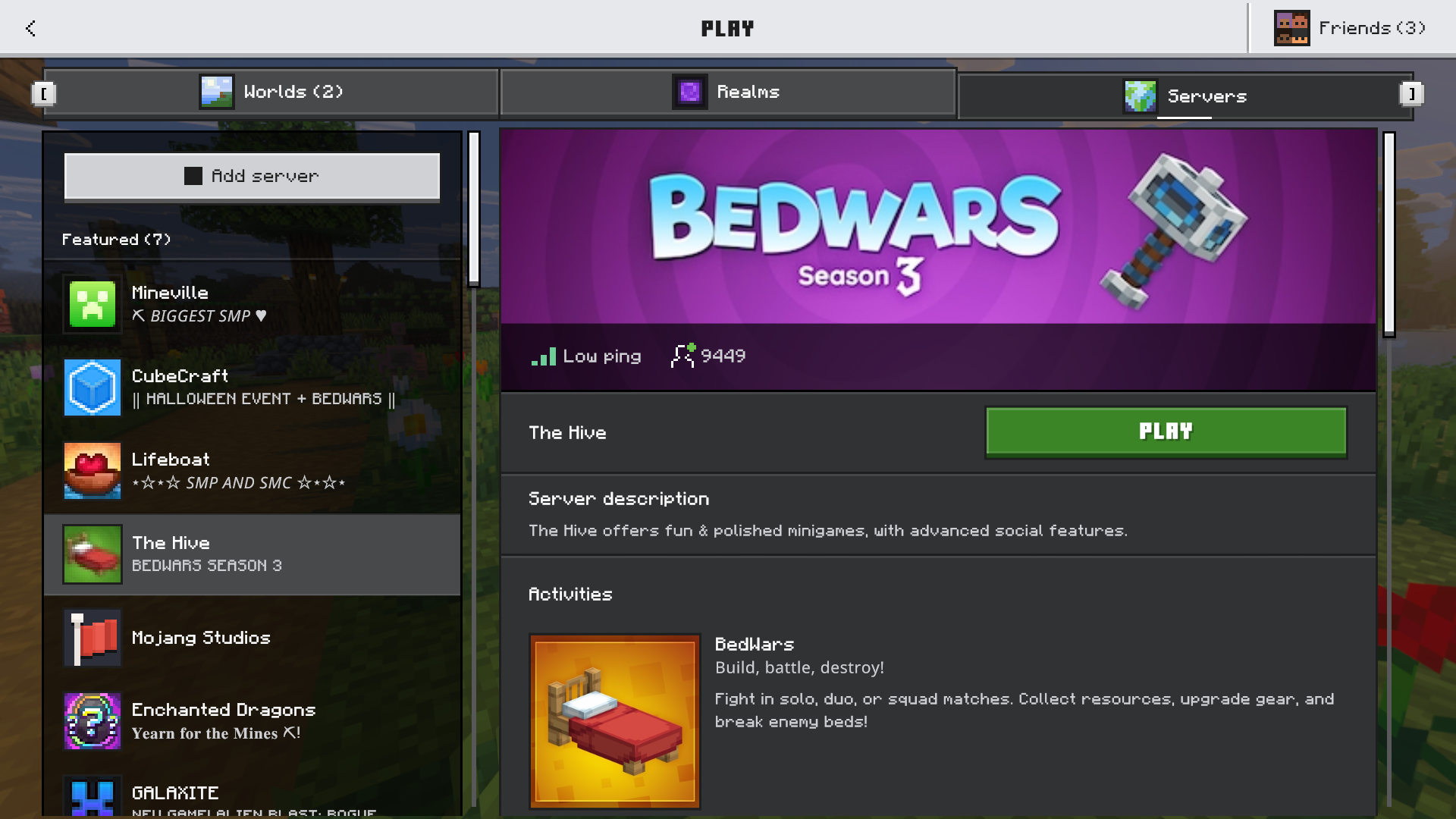
From the list, you can now select The Hive and join the server.
❓ How can I purchase Minecraft: Bedrock Edition?
On Windows devices, Minecraft can be purchased on the Microsoft Store.
On mobile devices, Minecraft can be purchased on the App Store for iOS and the Google Play Store for Android.
On Xbox, PlayStation, and Nintendo Switch consoles, you can purchase Minecraft digitally through the consoles' respective stores. You can also purchase a physical copy from most major retailers.
🌍 How do regions work?
To give you a smooth experience, no matter where in the world you're playing from, The Hive has multiple regions. When you join The Hive, you will automatically be connected to the region that is geographically closest to you.
The Hive has three regions:
- 🇺🇸 North America
- 🇪🇺 Europe
- 🇯🇵 Asia
To play with friends, you must be playing on the same region as them. You can switch regions in-game at any time by using the /region command or going to the region selector NPC in the hub.
🌏 Local Zones
Some of our main regions are divided into local zones. Local zones are not separate regions; they are smaller areas within our three main regions.
Players who join a local zone are still playing in the associated main region but may experience a smoother connection than when connecting to that region directly.
Currently, the following local zones exist:
- 🇦🇺 Australia (part of the Asia region)
- 🇮🇳 India (part of the Asia region)
If you are geographically close to a local zone, you will be automatically connected to it.
🌐 What is The Hive's IP address?
Because The Hive is a Featured Server, you can join it directly from Minecraft's servers tab, and you don't need to enter an IP address.
On devices that allow you to enter an IP address to join a server, you can use the following IPs to connect to The Hive:
The Hive's main IP address is: geo.hivebedrock.cloud
You can also connect directly to our regions and local zones using the following IPs:
- 🇺🇸 North America:
ca.hivebedrock.network - 🇪🇺 Europe:
fr.hivebedrock.network - 🇯🇵 Asia:
sg.hivebedrock.network- 🇦🇺 Australia (Asia local zone):
au.hivebedrock.network - 🇮🇳 India (Asia local zone):
in.hivebedrock.network
- 🇦🇺 Australia (Asia local zone):